For industrial project managers

Your project roadmap.
Ready for the steering committee.

Create a presentation-ready roadmap in five minutes and export it directly to PowerPoint. With Pro, describe your project and let AI build the first draft – ready for you to review and refine.

No credit card required · PowerPoint export included

Built on experience from more than 160 industrial projects →
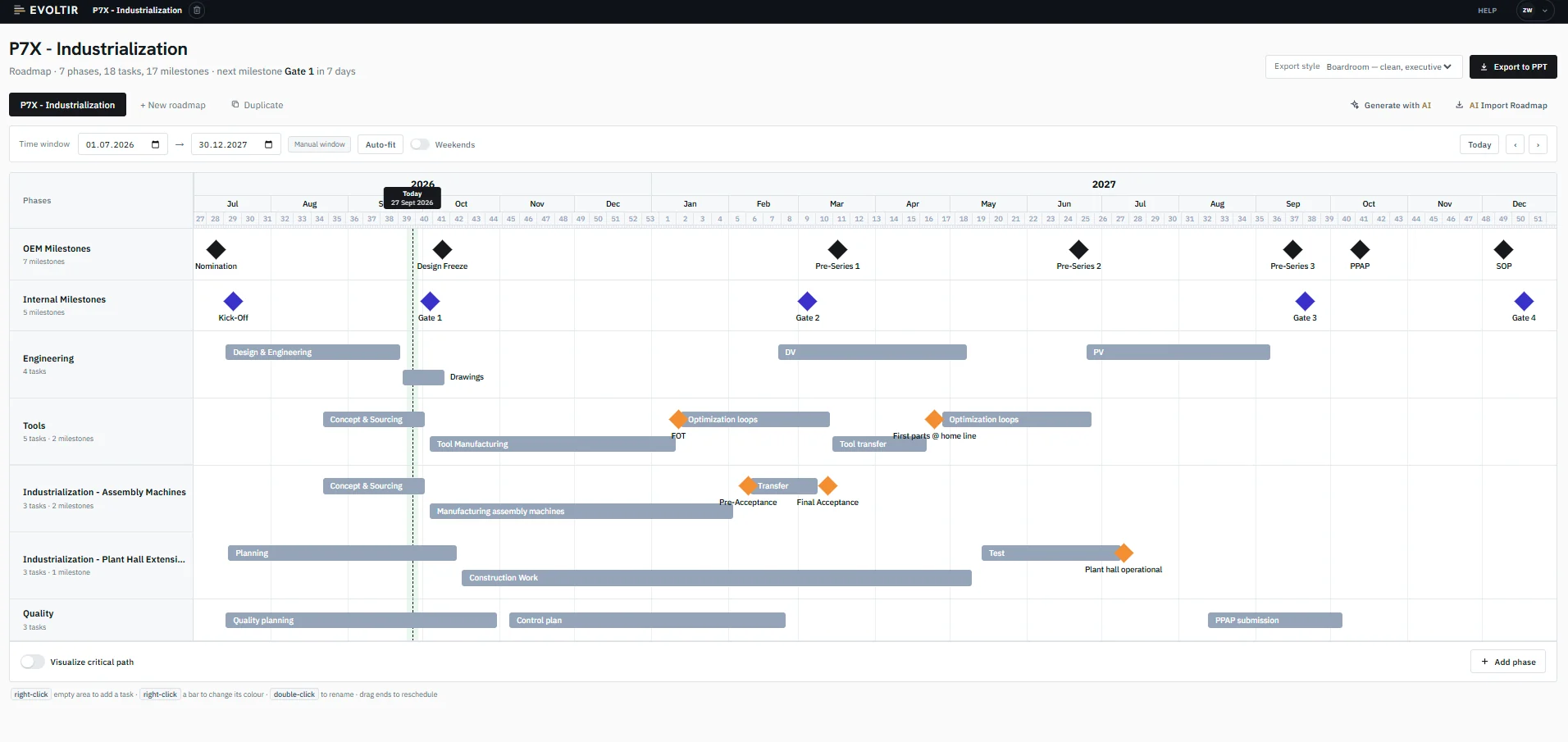
Evoltir Roadmap editor: phases, milestones and handovers on a single timeline
See the big picture

Bring phases, milestones and dependencies into one clear view.

Start with AI

Describe your project. Get an editable roadmap draft in about 30 seconds with Pro.

Ready to present

Export your roadmap as a PowerPoint slide, ready for your next management review.

How it works

Build. Refine. Present.

Turn your project plan into a clear timeline. Ready to present at your next review.

1. Build your roadmap

Create your plan in the editor, or describe your project and let AI generate a first draft with Pro.

2. Bring it up to date

Adjust dates, dependencies and status to reflect the latest project situation.

3. Present in PowerPoint

Export a presentation-ready slide for your steering committee, project review or customer meeting.

AI roadmap generation · Roadmap Pro

Describe your project. Get a roadmap draft in about 30 seconds.

Start with a few sentences or a detailed list of milestones and dates. AI turns your input into an editable timeline with phases, tasks, milestones and dependencies.

Example“Plan the development of a machine from January to December 2027. Design freeze on March 15, prototype on June 30, final acceptance on December 15. Include procurement, assembly and testing.”

1. Describe your project

Enter your project and any dates you already know. The draft comes back in the language you write in.

2. Review the draft

The timeline sits on the left. On the right, the milestone list shows which entries came from your description and which ones the AI suggested, with its assumptions listed underneath.

3. Create the roadmap

Click “Create” to accept the draft, rework your description, or discard it. Once accepted, the roadmap opens in the editor, ready to refine and export to PowerPoint.

Your dates stay fixed. The AI plans around the dates you enter. Nothing becomes a roadmap until you click “Create”.
Ready to present

Your roadmap, ready as a PowerPoint slide.

Export your roadmap as a slide for the steering committee or your next customer meeting.

Before the next review, update the plan and export the latest version in seconds.

In the editor
Evoltir Roadmap editor: phases, milestones and handovers on a single timeline
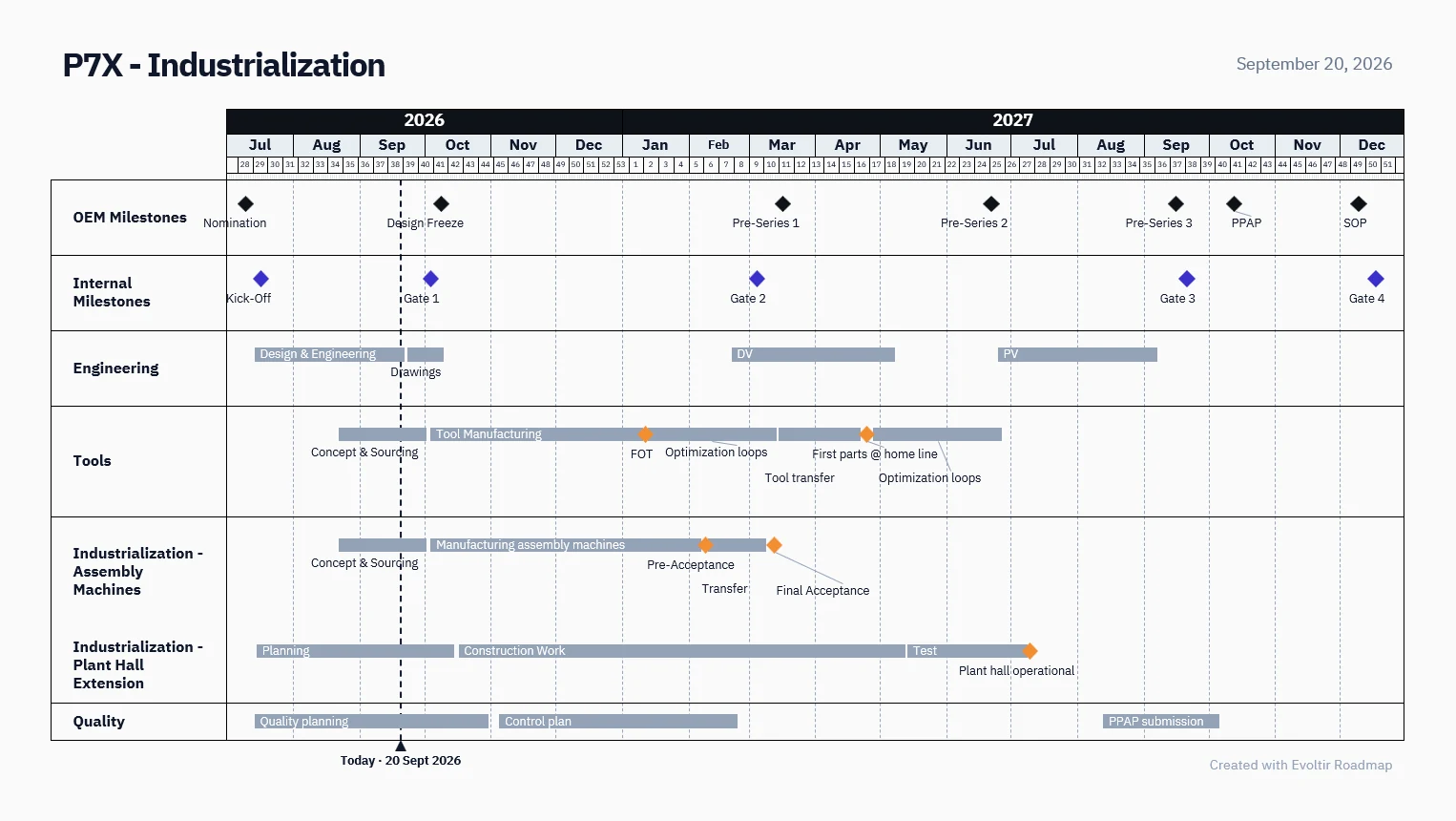
Exported slide (.pptx)
Management roadmap exported as a PowerPoint slide

PowerPoint export of a supplier industrialization covering engineering, tooling, quality and ramp-up.

Free: PowerPoint export with a small Evoltir credit.  ·  Pro: PowerPoint export without Evoltir branding.
Free, Pro & Team

Start free. Do more with Pro. Equip your team.

Create and export up to two active roadmaps for free. Upgrade to Pro for AI generation, unlimited active roadmaps and exports without Evoltir branding. Choose Team to give five editors access to all Pro features.

For individuals and teams

Roadmap Free

Free

For occasional roadmaps and project presentations.
€0/ month
Free forever. No billing.
Start for free

No credit card required.

  • 2 active roadmaps
  • Visual editor with phases, milestones, dependencies and status
Roadmap Pro

Pro

For AI-assisted planning and regular project reviews.
€11.58/ month
Billed annually at €139, incl. VAT.
Coming soon

Cancel anytime, effective at the end of your billing period.

  • Everything in Free
  • AI roadmap generation from your description
  • Drafts with labeled milestones and transparent assumptions
  • Unlimited active roadmaps
Roadmap Team

Team

For teams creating and presenting roadmaps together.
€45.75/ month
Billed annually at €549, incl. VAT. Includes 5 editors.
Coming soon

Cancel anytime, effective at the end of your billing period.

  • Everything in Pro
  • 5 editors included
  • Additional editors: €9.90 per editor per month, or €89 per year, incl. VAT

Paid plans launch shortly – start free and upgrade later.

Questions before you start.

What can I use for free?

With Free, you can build up to two active roadmaps in the visual editor and export them to PowerPoint. Exported slides carry a small Evoltir credit.

Do I need a credit card?

Not for Free. If you upgrade to Pro, you choose a payment method at checkout.

How do I create my first roadmap?

Start with a blank roadmap in the editor. With Pro, you can also describe your project in plain language and let the AI draft it for you.

What does Pro include?

AI roadmap generation from your description, unlimited active roadmaps and PowerPoint export without Evoltir branding.

How does AI roadmap generation work?

Describe your project in a single sentence or paste a detailed list of milestones and dates. About 30 seconds later you have a draft with a time window, phases, tasks, milestones and dependencies, written in the language of your input.

How can I tell what the AI suggested?

The draft view shows the timeline on the left and the milestones on the right. Every entry is labeled by origin, either taken from your input or suggested by the AI, and the assumptions are listed below.

What happens to the dates I set?

They stay fixed. The AI plans everything else around them.

When does the draft become a roadmap?

Only when you click “Create”. Until then, you can edit your description or discard the draft. Accepting it creates a new roadmap, or fills the empty roadmap you have open. Existing content is never overwritten.

Can I edit and export a generated roadmap?

Yes. Once created, it works like any other roadmap: edit it in the editor and export it to PowerPoint.

Is PowerPoint export included in Free?

Yes. Free exports carry a small “Created with Evoltir Roadmap” credit. Pro exports come without it.

Can I update my roadmap later?

Yes. Keep working on it in the editor and export the latest version to PowerPoint whenever you need it.

Who can see my roadmaps?

Your roadmaps are private by default and tied to your account. Access follows the permissions you grant. To learn how we handle your data, see our privacy policy.

How is Pro billed?

Choose monthly or annual billing. If you cancel, it takes effect at the end of your current billing period. You can manage your subscription in your Roadmap account.

Evoltir for your project organization

Connect project delivery, financials and portfolio decisions.

Bring schedules, risks, resources, changes, suppliers and costs into one system. Give teams and management a connected view of project performance and the information to act.

Your next project presentation starts here.

Sharpen your milestones and export your roadmap to PowerPoint. With Pro, you can start from an AI draft of your project description.

Start for free · No credit card required

Start for free
Create your first roadmap Start for free →